
Integrations for agencies
Exlink Integrations: Salesforce, Zoho CRM and the Exlink API
Agencies that recruit for sponsors on Exlink can send applications straight from their CRM into each sponsor's Exlink, attached files included, and get the application's status, program and placement written back onto the CRM record.
What a Connector Does
Exlink is where sponsors run their programs, and agencies send them applicants. A connector turns a record in the agency's CRM into an application in the sponsor's Exlink, and keeps that record up to date as the application moves on.
-
A record in your CRM
A Lead or Contact in Salesforce, or a record in Zoho CRM, with the files attached to it.
-
An application in the sponsor's Exlink
The first send creates the application on the sponsor's own form and uploads the files. Later sends update only what changed.
-
Status back on the record
The application's status, program and placement are written back onto the same CRM record.
Who It Is For
Agencies with a CRM
Your team already keeps its applicants in Salesforce or Zoho CRM. A connector sends each one to the sponsor from that record, so nobody types the application into Exlink a second time.
Agencies without a connector
No connector for your CRM? The Exlink API gives your developers the same endpoints the connectors use. No CRM at all? Leepr by Exlink is the CRM built for agencies.
Sponsors on Exlink
Your agencies' applications arrive in your Exlink on your own application forms, files included, and the agency sees the status in its own CRM.
Three Ways to Connect
Two connectors that work inside your CRM, and an API for agencies that build their own.
Salesforce Connector
A private managed package for Salesforce. Send a Lead or Contact to a sponsor's Exlink with one button, files included, and get status, program and placement back on the record.
Explore the Salesforce Connector →Zoho CRM Connector
A private Zoho CRM extension, installed from a link for your Zoho data centre. Send Leads, Contacts or custom-module records to a sponsor's Exlink, with mapping and write-back on Exlink.
Explore the Zoho CRM Connector →Exlink API
For agencies without a CRM connector or Leepr: your own API key to the same Exlink endpoints the connectors use, for applications, files, status and travel.
Explore the Exlink API →How Connecting Works
Four steps, once per sponsor. After that, sending an applicant is one button on the record.
- 1
Install
Your CRM admin installs the Exlink package for Salesforce, or the Exlink extension for Zoho CRM, from the private install link we send. For Zoho CRM, the link is for your data centre.
- 2
Connect to Exlink
The admin runs Connect to Exlink and picks the sponsor: the Exlink directory finds the sponsors that know the admin's email, or the admin enters the sponsor's Exlink address.
- 3
Approve
A member of your agency signs in to the sponsor's Exlink and approves the connection with one click. The connection now belongs to your agency at that sponsor.
- 4
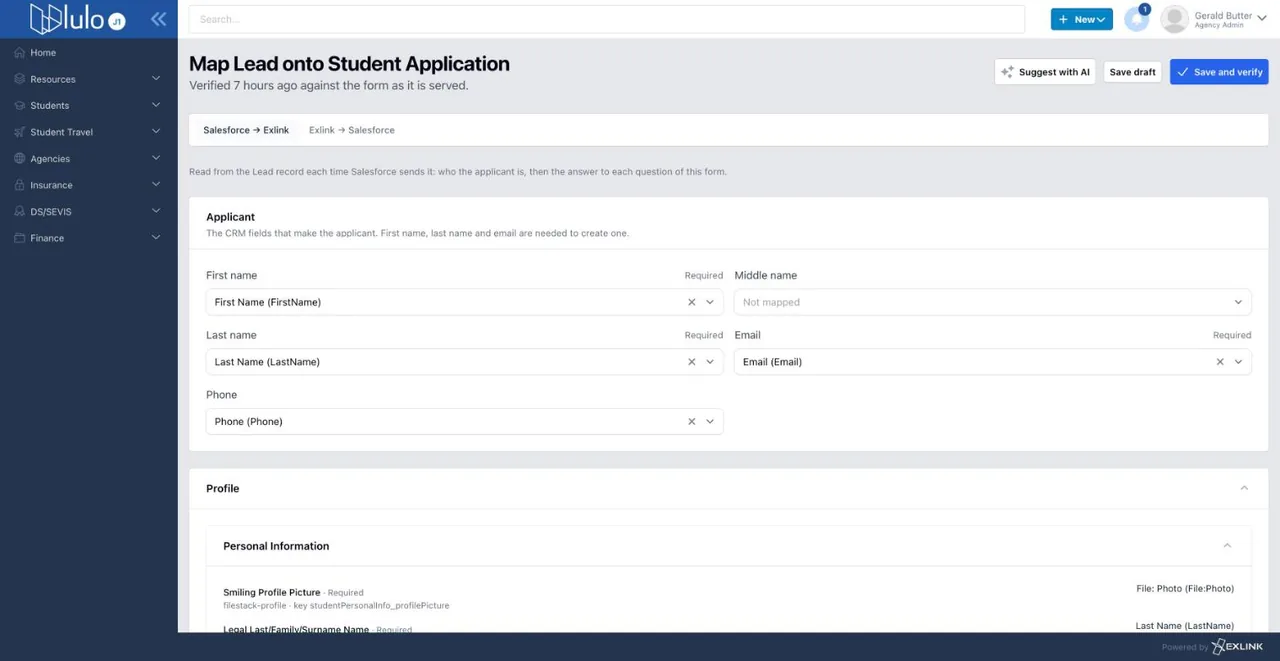
Map
On Exlink, the member maps your CRM fields onto each of the sponsor's application forms, including picklist options and a file slot per document type, with AI suggestions to review before saving.
One Pricing Model for All Three
Rates depend on volume, so there is no price list: contact us for a quote.
A yearly fee
Covers the integration's maintenance and its upgrades.
A usage fee
Per application sent with the Salesforce or Zoho CRM connector. With the Exlink API, a flat monthly fee, charged only in the months the API is used.
Status sync included
Syncing the application's status, program and placement back onto the record is included.
Frequently Asked Questions
Does a connector give Exlink access to our CRM?
Not with Salesforce: Exlink never calls into your Salesforce org. There is no Connected App, OAuth grant or integration user. The package in your org calls out to the sponsor's Exlink with a key it receives when the connection is approved, and that key can be revoked on Exlink. With Zoho CRM, Exlink fetches the attached files and writes the status back through an OAuth grant that your agency approves.
What data does a connector send to the sponsor?
Only what is mapped. The application is built from the CRM fields a member of your agency mapped onto the sponsor's application form, plus the files attached with a document type. Fields that are not mapped do not become part of the application.
How are files handled?
Files attached to the record with a document type, such as a passport photo page or a transcript, are uploaded with the application, up to 10 MB each. On Exlink, each document type is a file slot that you map onto the form's file questions.
Who approves a connection?
A member of your agency on the sponsor's Exlink approves it with one click. The connection then belongs to your agency at that sponsor. To send to another sponsor, you connect to that sponsor and approve the connection on its Exlink.
What happens when the sponsor's form or our CRM fields change?
Each mapping belongs to one of the sponsor's application forms and is verified against that form as the sponsor serves it, so you can see when it was last checked and verify it again after the form changes. After you add or change fields in your CRM, Refresh fields tells you what changed and which mappings need review.
Do we need a CRM to connect?
No. Leepr by Exlink is a CRM built for agencies that sends applications straight into the sponsor's Exlink, and the Exlink API is there for agencies that would rather build their own integration. Explore Leepr for Agencies →
How much do the integrations cost?
A yearly fee that covers maintenance and upgrades, plus a usage fee: one per application sent with a connector, or a flat monthly fee in the months the Exlink API is used. Status sync is included. Rates depend on volume, so contact us for a quote. Contact us →
Connect Your CRM to Exlink
Tell us which CRM your agency uses and which sponsors you recruit for. We will send you the install link and a quote.